Digital Marketing

ASO strategies are the ongoing, data-driven actions you take to improve your app’s visibility and conversion rate inside the App Store and Google Play. They cover keyword research, metadata optimisation, visual assets, ratings, and retention signals, all working together to help your app get found and installed.
Most app owners treat this as a one-time setup. Add a keyword to the title. Upload some screenshots. Ship it. That used to be enough. It no longer is.
App stores now analyze how users behave after they install your app. Do they keep it? Do they use it regularly? Do they leave good ratings? These engagement signals heavily influence your rankings. The bar has moved. Good metadata gets you into the game. Everything else determines whether you stay there.
The bigger shift is about engagement. Both app stores are moving weight from raw download counts toward retention and stability metrics. Apps with strong Day 7 retention are ranking above competitors that have more downloads but weaker engagement. For ASO teams, this means the ranking algorithm now cares about product quality, not just store listing quality.
Here are 13 ASO strategies that reflect how both stores actually work right now.
Both Apple and Google have moved away from simple character-string matching to a semantic model. The algorithms now prioritise the context of a search query over the presence of a specific word. Keyword stuffing doesn’t just fail – it signals low quality to the algorithm.
At WWDC 2025, Apple announced AI-generated App Store Tags – labels created from app metadata that affect browser placements.
Since 2025, app stability, update frequency, and retention have had a more visible impact on rankings. The stores are building systems that reward genuinely useful apps. That context matters before you touch a single metadata field.
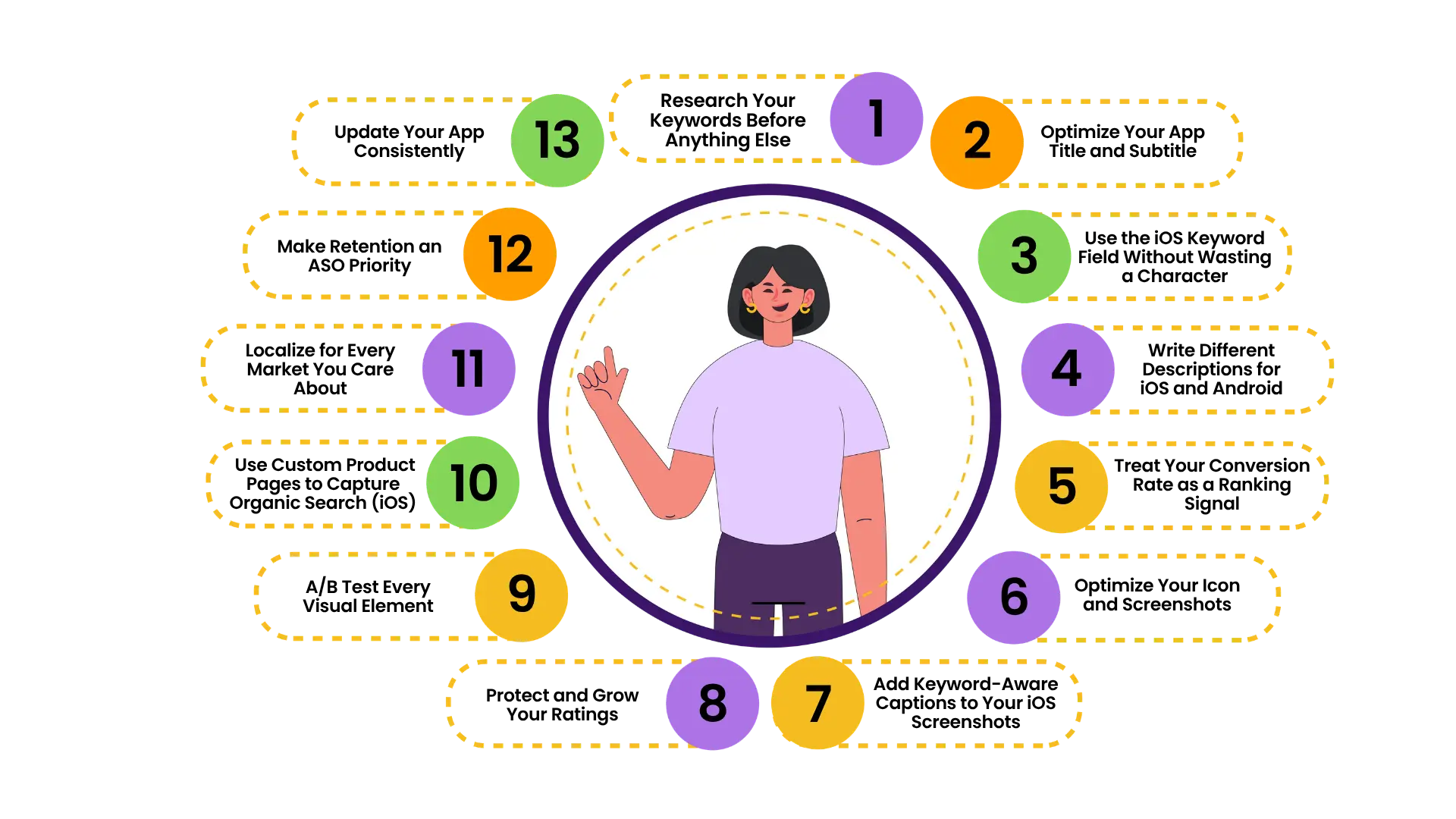
Every other strategy depends on this one. Long-tail keywords – phrases of three or more words – often drive the highest conversion rates because they signal specific intent. Though search volume is lower, these terms can deliver higher-quality users with better retention and monetization profiles.
Use tools like Sensor Tower, AppTweak, and Data.ai to uncover high-volume, low-difficulty keywords that match user intent. By analyzing competitor gap reports, you can discover untapped terms where your app can quickly rank. Revisit your keyword list every quarter. Search behavior shifts, and there are always new opportunities to capture.
Your app title remains the single most heavily weighted text field in the algorithm. The first 30 characters on iOS, or 50 on Android, signal relevance to the algorithm before any other asset loads.
The pattern that consistently wins: Brand + Primary Keyword. If your target users type “expense tracker,” that exact phrase should open your title, not close it. Position within the character limit matters. The first keyword carries more algorithmic weight than the last.
On iOS, use the subtitle for your next most important keyword. And never repeat words across both fields. Repeating any term already in the title or subtitle wastes characters that could index an entirely different query. Every comma-separated token should be net-new vocabulary.
Apple’s hidden 100-character keyword field is a token list, not a phrase repository. The algorithm combines tokens from the title, subtitle, and keywords fields to construct searchable phrase variants. If your title contains “Fitness” and your keyword field contains “tracker, women, home,” the system indexes “fitness tracker for women at home” even though that exact string appears nowhere.
Apple ignores duplicate keywords. Ensure every character in your 100-character keyword field is a unique term not already present in your title or subtitle. Treat it like a crossword with no room for repetition.
One of the most common mistakes is applying the same optimization to iOS and Android. The platforms work differently, and the strategy for each needs to be built separately.
On Google Play: Google Play’s algorithm reads your entire long description, making it closer to traditional SEO than Apple. Google uses skip-gram analysis on descriptions, meaning it understands relationships between words, not just exact matches. Writing naturally matters more than stuffing keywords. Aim for roughly one exact keyword match per 250 characters in the description. Keyword stuffing hurts rankings.
On iOS: Apple’s App Store does not index the long description for search. Your description affects conversion – convincing users to download after they find you, not discovery. Don’t waste time stuffing keywords into your App Store description. Write it entirely for the reader.
ASO is no longer just about getting people to find your app. It’s about getting them to download it. Conversion rate has become a direct ranking factor. If your app ranks #1 for a keyword but has a 1% CVR while the app at #2 has a 5% CVR, the algorithm will eventually swap their positions.
In ASO, keywords are half the work. The other half is convincing a user to install the app in a few seconds. Your icon, screenshots, video, and rating all feed into that decision. If your listing doesn’t convert well, your ranking will erode regardless of how strong your keyword placement is.
Your icon, screenshots, and preview video are no longer post-ranking polish. They are part of the ranking input layer. A listing can rank well in search and still underperform if the icon is weak, screenshots are generic, ratings are shaky, or the messaging does not match the intent behind the search.
App screenshots should be based on storytelling. The optimal number is 5 to 8, the first showing the main benefit, the second the unique selling point, the third social proof, and the remaining shots covering main use scenarios and innovative features.
Don’t treat screenshots as a launch-day asset you never revisit. 74% of top-ranked apps update their listings monthly.
This one matters more than most app owners realize.
In June 2025, Apple began extracting text from screenshot captions and treating it as keyword metadata for search ranking. Appfigures called this “one of the most significant algorithm changes in years.”
Keywords in screenshot captions can strengthen existing keywords from your title, subtitle, and keyword field. They can also introduce entirely new keywords not in your traditional metadata. Unlike title or keyword field duplication, screenshot keywords don’t compete with your other metadata fields.
If your captions are decorative taglines with no keyword intention behind them, update them. They are now a live ranking surface.
According to AppTweak’s ASO Trends and Benchmarks Report 2025, 90% of featured apps on the App Store had a rating of 4.0 or higher.
An app with a low rating won’t reach the top even with strong text optimization.
Respond to negative reviews within 24 to 48 hours. Acknowledge the problem and fix it – don’t reply with templates. Users who receive a real response to a bad review frequently update their rating.
Request a rating at the moment of success: after completing a level, making a purchase, or finishing a key action. Asking immediately after install is annoying and produces poor ratings.
Also worth noting: ignoring user reviews on Google Play is a critical mistake. Google indexes the keywords used by your users in their feedback. Encouraging users to mention specific features in their reviews can indirectly improve your rankings for those feature-related terms.
Gut instinct doesn’t hold up here. The data decides. Use A/B testing and custom product pages to continually improve your app’s store listing – icons, screenshots, descriptions – and boost conversion rates. Simply adding an App Store preview video and refining screenshots can lift conversion by 10 to 30%.
Test one hypothesis per release – for example, strengthening the description for one market or rebuilding semantics for another. Multiple changes at once make it impossible to know what worked.
Google Play has built-in Store Listing Experiments. iOS uses Product Page Optimization for visual testing. Use both. Measure separately. Never change multiple variables in the same cycle.
This is a major strategic shift that many iOS app teams haven’t acted on yet.
Custom product pages got a bigger role in July 2025. Before that change, they only appeared through paid campaigns. Now they show up in organic search results for their assigned keywords. Apple also doubled the limit from 35 to 70 active pages per app in early 2026, which turns custom product pages from an advertising feature into an organic search tool.
Each page can be tailored to a specific keyword cluster and audience segment. The implication is significant: you can show a different version of your app listing to different searchers, all within organic search, with no ad spend required.
Translating and optimizing your keyword set for each target market – accounting for local slang, script direction, and cultural nuances – can double or triple your impressions in non-English stores.
Localization is more than translation. Localized ASO strategies reduce uninstall rates because the user sees native slang and use cases. This is especially effective for mobile applications in fintech, health, and education, where trust is formed at the listing stage.
Start with English, Spanish, Portuguese, and Japanese – the highest ROI markets in 2025. Then expand based on where your install data shows untapped demand.
This is the strategy most app teams are still catching up to.
Google Play now prioritizes retention and engagement over raw install volume. An app with 10,000 installs and 40% Day 1 retention can outrank an app with 100,000 installs and 15% retention.
Apps with longer session lengths, high retention, and low uninstall rates rank higher. A download is the beginning of the ranking signal, not the end. If users uninstall within two days, your rankings will fall regardless of how well your metadata is optimized. The in-app experience is now an ASO problem too.
Updating your app can directly and indirectly boost ranking. Directly, an update can generate a spike in download velocity, especially if you coordinate it with marketing or if the update attracts lapsed users back. Indirectly, updates improve app quality and performance, leading to better reviews and retention.
In 2025, top apps tend to push updates frequently – many release 1 to 4 updates each month on average. You don’t need to update weekly without a reason. But meaningful improvements at a steady pace send a consistent quality signal to both stores.

Not all 13 need to happen at once. Start with keyword research, then build platform-specific metadata for iOS and Android separately. Get your rating above 4.0 before spending on any paid campaigns. Once the foundation is solid, move into visual A/B testing, CPPs, and localization.
ASO isn’t a one-and-done campaign – it’s an investment in long-term equity. Every optimization you make to your keyword set, title, or creatives builds momentum in the app stores’ ranking algorithms. Over quarters, these signals compound: what starts as a small bump in impressions can turn into a dramatic surge in organic downloads.
Run retention as a constant thread beneath all of it. The stores are watching what users do after they install, not just whether they installed.
The apps that rank consistently aren’t the ones that optimized once and moved on. ASO represents a comprehensive, ongoing effort to align your app with both user needs and app store algorithms. Business leaders should view it not as a one-time checklist item, but as a core part of product and marketing strategy – something that evolves in step with your app and audience.
ASO is a continuous, iterative process, but the payoff is a steady stream of organic users and reduced reliance on paid user acquisition. Unlike a paid campaign, that effect doesn’t disappear the moment your budget does. Pick two or three of these ASO strategies to act on this week. Test, measure, and build from there.
If you want a second pair of eyes on your app’s current store listing, or you’re not sure where to start, Digital SEO Land can help. We work with app owners and marketing teams to build optimization strategies grounded in current data. Get in touch with us.
Imagine waking up one morning, checking your website analytics tools, and seeing a sudden drop in website traffic....
Read Case Study
As a website owner, you must be aware of the importance of ranking on the first page of...
Read Case Study
AI Services





Link Building




Resources